
Features / Post-Login Redirects
Send Users to the Right Page After Login
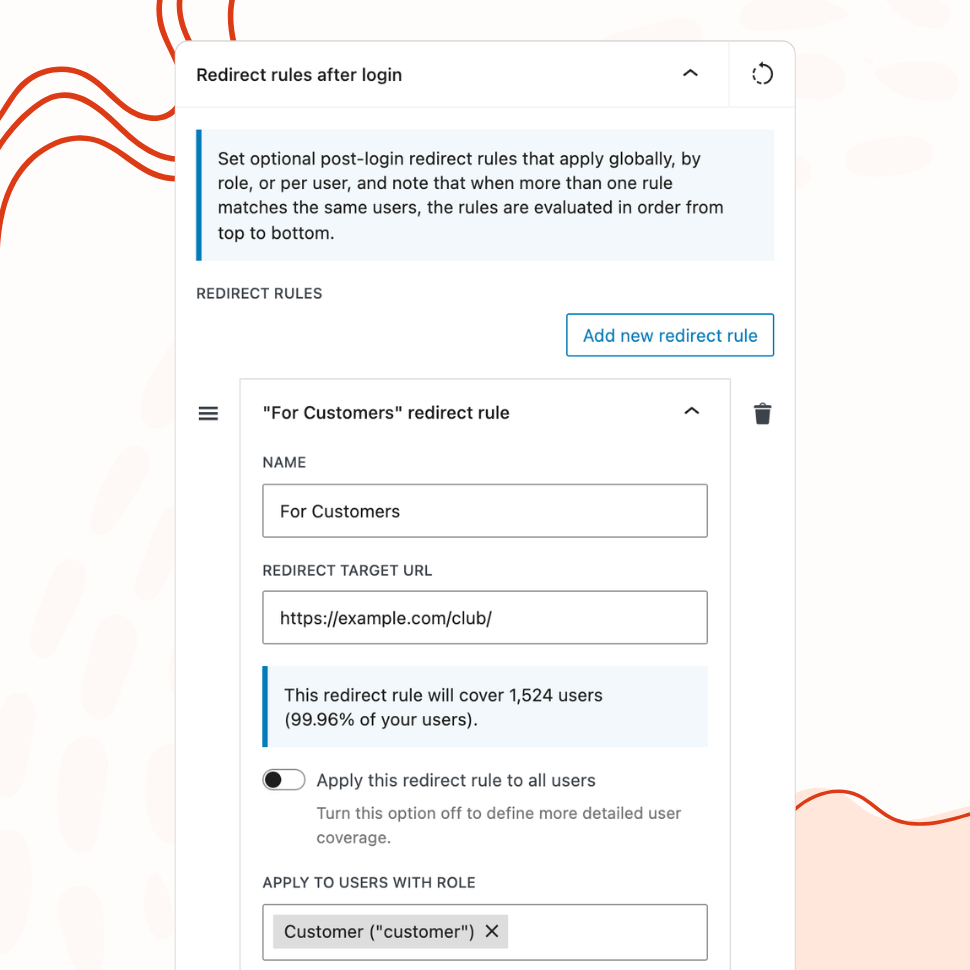
Define redirect rules by user role or individual user, so administrators, editors, and subscribers each land exactly where they should.
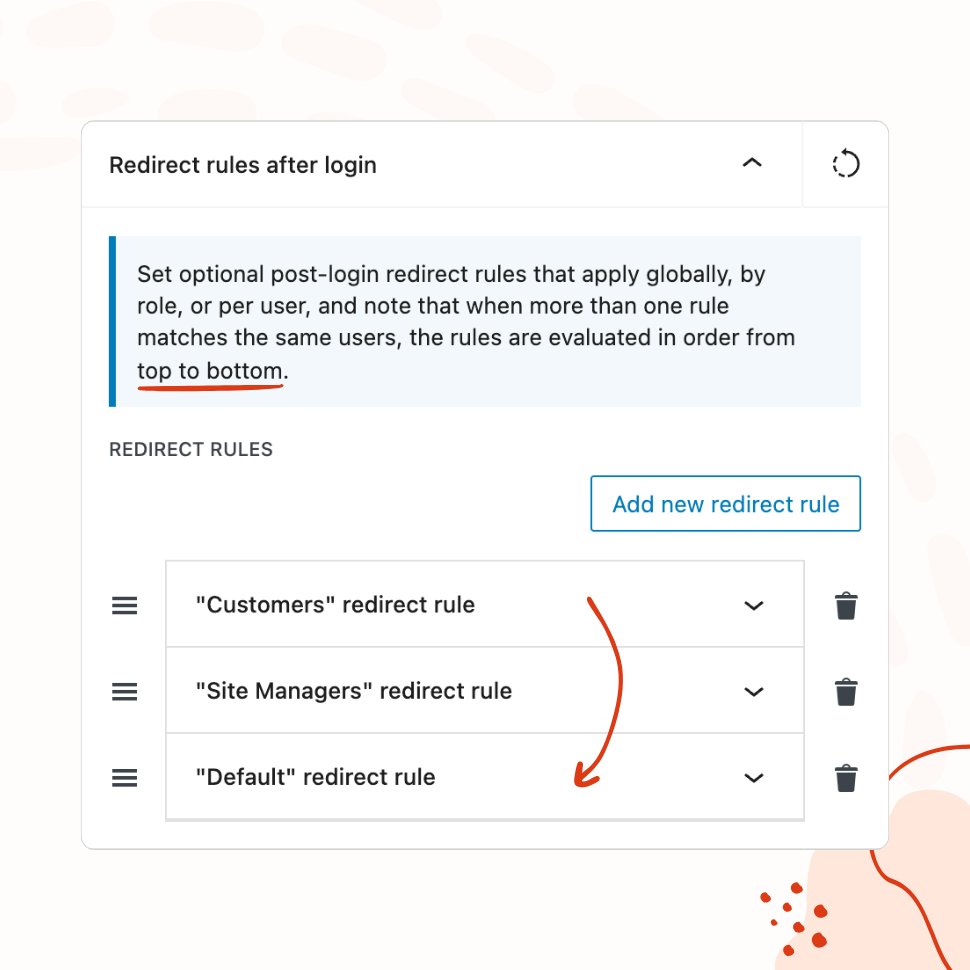
- Create multiple rules arranged by priority — first match wins
- Target all users, specific roles, or individual usernames
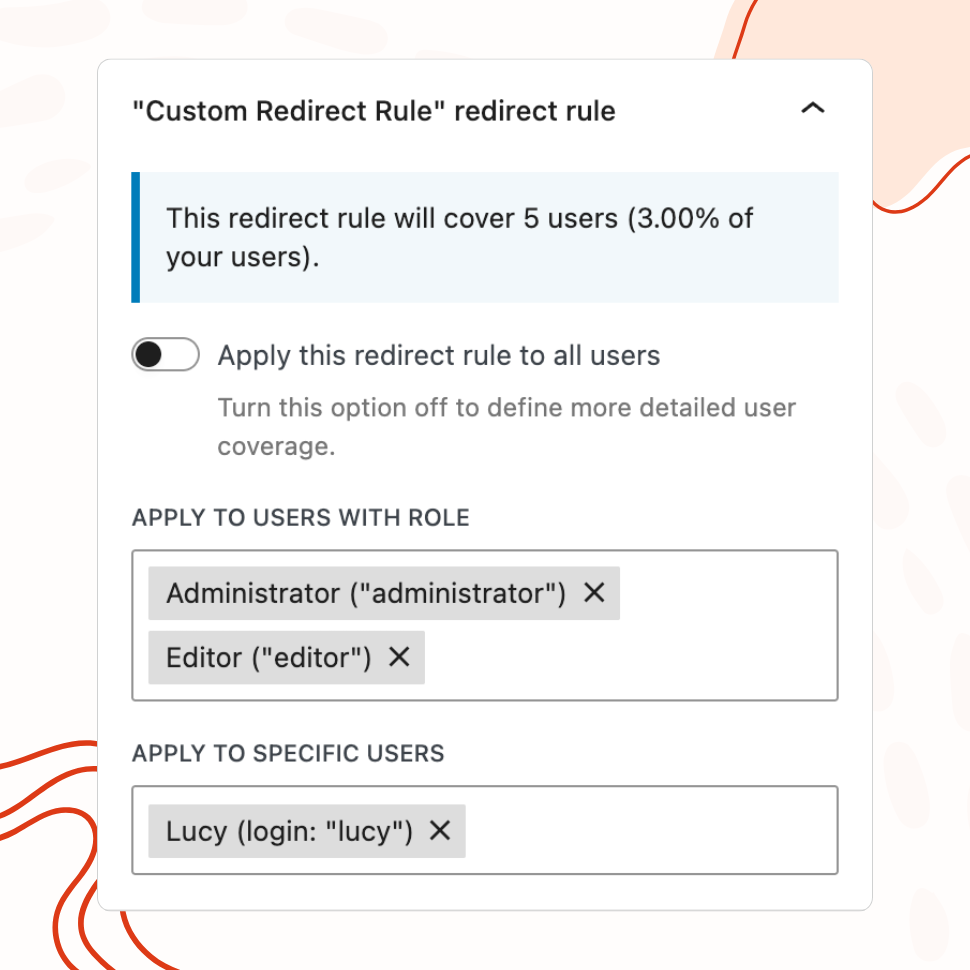
- Live coverage calculator shows affected user count and percentage
You’re fully covered by our 30-day risk-free money-back guarantee.
Rule Priority
Ordered Rules Evaluated from Top to Bottom
Create multiple redirect rules and arrange them by priority. The first matching rule determines where the user is sent.
User Targeting
Target All Users, Specific Roles, or Individual Users
Apply redirect rules globally, to specific user roles like administrators or subscribers, or to individual users by name.
COverage Calculator
See Exactly How Many Users Each Rule Affects
A built-in coverage calculator shows the number and percentage of users affected by each redirect rule.
Common Redirect Use Cases
By default, WordPress sends every user to the same place after login: the admin dashboard. That’s fine when the only people logging in are site administrators, but most WordPress sites serve multiple types of users — and the dashboard is rarely the right destination for all of them.
Post-login redirects let you define where each user ends up based on their role or identity. Instead of a one-size-fits-all experience, every user lands on the page most relevant to what they came to do. The result is fewer confused users, fewer support requests about navigation, and a site that feels purpose-built for each audience.
Rules are evaluated in order from top to bottom, with the first matching rule determining the destination. This priority system lets you create specific rules for individual users that override broader role-based rules, giving you precise control without complex configuration.
Redirect Administrators to the Dashboard
This is the simplest and most common rule — and often the one that makes all other redirects possible. Create a rule targeting the Administrator role with the destination set to /wp-admin/. This keeps the default behavior for site administrators while freeing you to redirect everyone else somewhere more appropriate.
Without this rule in place, changing the default redirect for all users would also affect administrators, sending them away from the dashboard they need to do their work. By explicitly routing administrators to the dashboard first and placing this rule at the top of the priority list, every subsequent rule can focus on non-admin users without worrying about side effects.
Send Subscribers to Their Profile or a Custom Page
Subscribers who log into a WordPress site and land on the admin dashboard see a stripped-down screen with almost nothing they can do. It’s confusing and unhelpful — they came to interact with the site’s frontend, not its backend.
A redirect rule targeting the Subscriber role can send these users directly to their profile page, an account management screen, or any custom page you’ve built for logged-in users. A community site might redirect subscribers to the member directory. A course platform might redirect them to their learning dashboard. A news site might redirect them to a personalized reading list.
The destination URL can be any path on your site, so the redirect works with whatever frontend experience you’ve built — whether that’s a BuddyPress profile, a custom page template, or a simple “Welcome back” landing page.
Route WooCommerce Customers to the Shop Page
WooCommerce customers typically log in for one of two reasons: to check an order or to continue shopping. Neither of those tasks starts in the WordPress admin dashboard.
A redirect rule targeting the Customer role (the default WooCommerce role for buyers) can send them to the shop page, their account page at /my-account/, or the orders screen at /my-account/orders/. The best destination depends on your store’s typical customer behavior — a store with high repeat purchase rates might benefit from redirecting to the shop, while a store where customers frequently check shipping status might redirect to the orders page.
You can also combine role-based and user-based rules for VIP treatment. A general rule sends all customers to the shop page, but a specific rule for a key wholesale buyer redirects them to a dedicated wholesale catalog page. The user-specific rule takes priority because it sits higher in the list.
Guide Membership Users to Protected Content
Membership and LMS sites have the strongest case for post-login redirects because the entire value proposition is behind the login form. A member who logs in and sees the WordPress dashboard instead of the content they’re paying to access will assume something is broken.
For membership sites, the redirect destination should match what the member came for. A redirect rule targeting the appropriate membership role can send users to the members-only content area, a course dashboard, a community forum, or a personalized home page that surfaces their most relevant content.
For sites with multiple membership tiers, the priority system becomes especially useful. A rule for Premium members redirects to the full content library. A rule for Basic members redirects to the basic content area. A rule for expired or free-tier users redirects to the upgrade page. Each rule fires only for its target audience, and the top-to-bottom evaluation means you can order them from most specific to most general without conflicts.
Features
Explore These Powerful Features Next
Discover the features offered by the WP Custom Login plugin for WordPress.
Pre-Designed Templates
Choose from 20+ ready-made login page designs and apply them with one click. Use any template as a starting point, then customize freely.
Custom Logo & Branding
Replace the WordPress logo with your own image or site icon. Add a branded footer and social media links to create a fully personalized login page.
Form & Input Styling
Customize labels, input fields, buttons, checkboxes, and error messages with granular controls — including separate styles for normal, hover, and focus states.
Advanced Backgrounds & Layouts
Use split-screen layouts, image and video sliders, animated gradients, and CSS filters to create a premium login page that goes beyond a simple background color.
Post-Login Redirects
Define redirect rules based on user roles or individual users, so administrators, editors, and subscribers each land on the most relevant page after login.
Custom Login URL
Replace wp-login.php with a custom login path. Block or redirect direct access to the default URL, with built-in validation to prevent lockouts.
Easy Setup with Live Preview
Configure every aspect of your login page from a visual settings panel with an instant live preview. No CSS knowledge or page refreshing required.