
Features / Custom Login URL
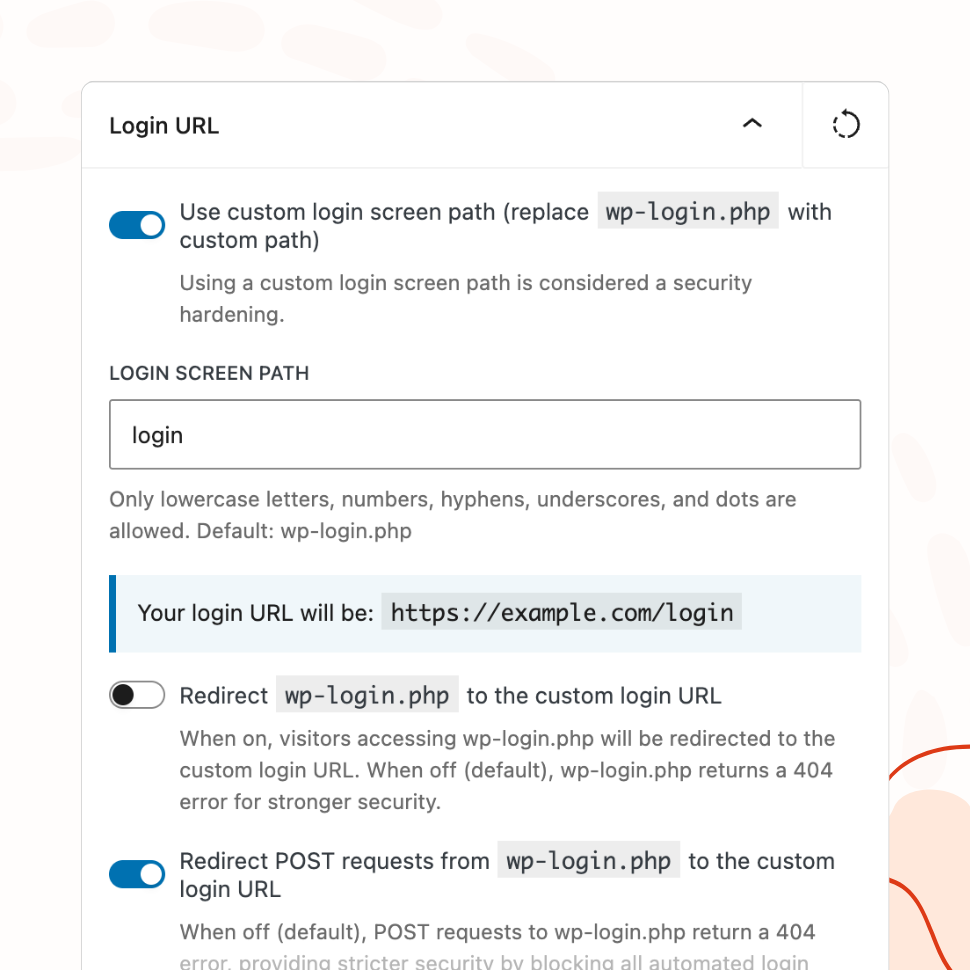
Replace /wp-login.php with Your Own Login Path
Hide the default WordPress login URL and replace it with a custom path. Block or redirect direct access to default login URL for added security.
- Choose between a 404 response or redirect for direct
/wp-login.phpaccess - Automatic validation against reserved slugs to prevent lockouts
- Configurable handling for POST requests to the old path
You’re fully covered by our 30-day risk-free money-back guarantee.
Security Benefits
Reduce Bot Attacks by Hiding the Default Login Path
Automated bots target wp-login.php by default. Replacing it with a custom URL removes this easy attack vector.
Configuration Options
Full Control Over Login URL Behavior
Set your custom login path, choose whether to redirect or return a 404 for direct wp-login.php access, and configure POST request handling.
Validation & Safety
Built-In Protection Against Misconfiguration
The plugin validates your custom path against reserved WordPress slugs and sanitizes input to prevent accidental lockouts.
Need any support with getting started? Review the plugin’s documentation and tutorials or contact us.
Why Custom Login URLs Are a Security Best Practice
Every WordPress site in the world uses the same login URL by default: wp-login.php. This is public knowledge, and automated attack tools exploit it constantly. Bots don’t need to discover your login page — they already know where it is.
Replacing wp-login.php with a custom path doesn’t make your site invulnerable, and it shouldn’t be your only security measure. But it removes the lowest-hanging fruit that automated tools rely on, and it’s one of the simplest changes you can make to reduce unwanted traffic to your login page. Security professionals routinely recommend it as part of a layered defense strategy.
WP Custom Login PRO handles this with a dedicated feature that replaces the default login path, manages redirects and 404 responses for direct wp-login.php access, and validates your custom path against reserved WordPress slugs to prevent misconfiguration.
Reducing the Attack Surface
The vast majority of brute-force login attempts against WordPress sites are automated. Bots scan IP ranges, find WordPress installations, and immediately hit wp-login.php with credential lists — thousands of username and password combinations in rapid succession. They don’t check whether the URL exists first; they assume it does, because on nearly every WordPress site, it does.
Replacing wp-login.php with a custom path breaks this assumption. When a bot requests wp-login.php and receives a 404 response instead of a login form, it moves on. The bot doesn’t know your actual login URL, and it has no reason to look for it — there are millions of other sites still using the default path.
This won’t stop a targeted attacker who specifically researches your site. But it eliminates the background noise of automated scans that every WordPress site experiences. Server logs become cleaner, failed login attempt counts drop, and resources that were being consumed by bot traffic are freed up.
Complementing Other Security Measures
A custom login URL works best as one layer in a broader security setup, not as a standalone solution. It pairs naturally with other common practices.
Rate limiting and login attempt restrictions become more effective when the only traffic reaching your login page comes from users who know the actual URL. Without a custom path, rate limiting has to handle a constant stream of bot requests alongside legitimate login attempts. With a custom path, the volume of illegitimate requests drops significantly, so rate limiting can focus on the edge cases that get through.
Two-factor authentication remains essential regardless of your login URL. A custom path reduces who finds the login form; two-factor authentication protects the form itself. The two measures address different parts of the problem and are strongest when used together.
Strong password policies — like those enforced by WP Password Policy — protect against the credentials themselves being weak. A custom login URL reduces exposure; strong passwords reduce vulnerability. Again, different layers solving different problems.
The practical benefit of combining these measures is that each one reduces the load on the others. Fewer bots reaching the login page means fewer brute-force attempts to rate-limit, fewer failed logins to log, and fewer unnecessary authentication checks consuming server resources.
Keeping the Login Path Private
A custom login URL is only effective if it stays private. WP Custom Login PRO includes safeguards that help prevent accidental exposure.
The plugin validates your chosen path against reserved WordPress slugs — paths like wp-admin, login, register, and other strings that WordPress uses internally. This prevents you from choosing a path that conflicts with existing functionality or that’s obvious enough for automated tools to guess.
When a visitor or bot accesses wp-login.php directly, you control what happens. The plugin can return a 404 page — making it appear as though no login page exists at that URL — or redirect the request to your custom login path. The 404 option is more secure because it reveals nothing; the redirect option is more convenient for users who have the old URL bookmarked.
POST request handling is configurable separately. This matters because some plugins and external services submit login requests directly to wp-login.php. You can choose to block these or allow them, depending on your site’s specific integrations.
The main risk to a custom login URL is human, not technical. Sharing the login link in a public channel, including it in an unprotected email, or embedding it in client-facing documentation that’s publicly indexed can all expose the path. The plugin does its part by keeping the URL out of the page source and rewriting internal WordPress references to use the custom path — but communicating the login URL through private channels is ultimately your responsibility.
Features
Explore These Powerful Features Next
Discover the features offered by the WP Custom Login plugin for WordPress.
Pre-Designed Templates
Choose from 20+ ready-made login page designs and apply them with one click. Use any template as a starting point, then customize freely.
Custom Logo & Branding
Replace the WordPress logo with your own image or site icon. Add a branded footer and social media links to create a fully personalized login page.
Form & Input Styling
Customize labels, input fields, buttons, checkboxes, and error messages with granular controls — including separate styles for normal, hover, and focus states.
Advanced Backgrounds & Layouts
Use split-screen layouts, image and video sliders, animated gradients, and CSS filters to create a premium login page that goes beyond a simple background color.
Post-Login Redirects
Define redirect rules based on user roles or individual users, so administrators, editors, and subscribers each land on the most relevant page after login.
Custom Login URL
Replace wp-login.php with a custom login path. Block or redirect direct access to the default URL, with built-in validation to prevent lockouts.
Easy Setup with Live Preview
Configure every aspect of your login page from a visual settings panel with an instant live preview. No CSS knowledge or page refreshing required.