
Features / Advanced Backgrounds & Layouts
Create Stunning Split-Screen and Slider Backgrounds
Go beyond a simple background color. Use multi-column layouts, image and video sliders, animated gradients, and CSS filters to create a premium login page.
- 5 layout modes, including split-screen
- Combine image, video, gradient, and animated slides
- CSS image filters: blur, contrast, grayscale, and more
You’re fully covered by our 30-day risk-free money-back guarantee.
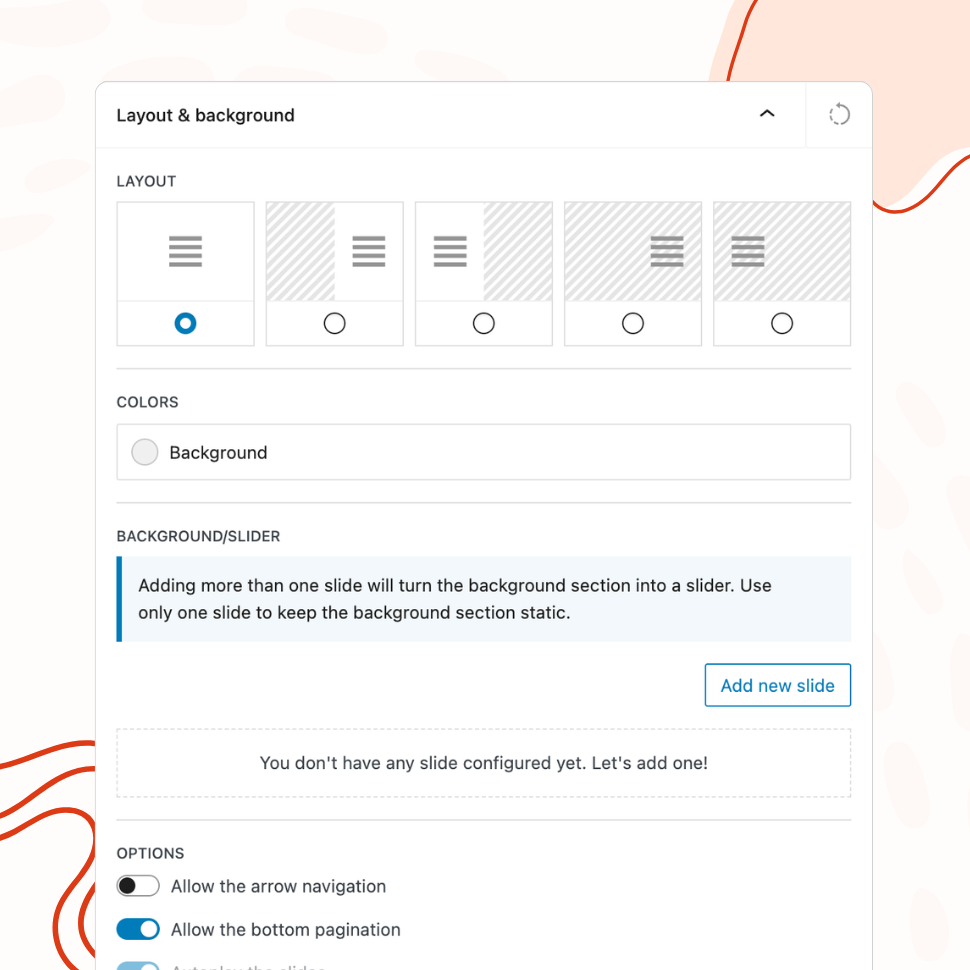
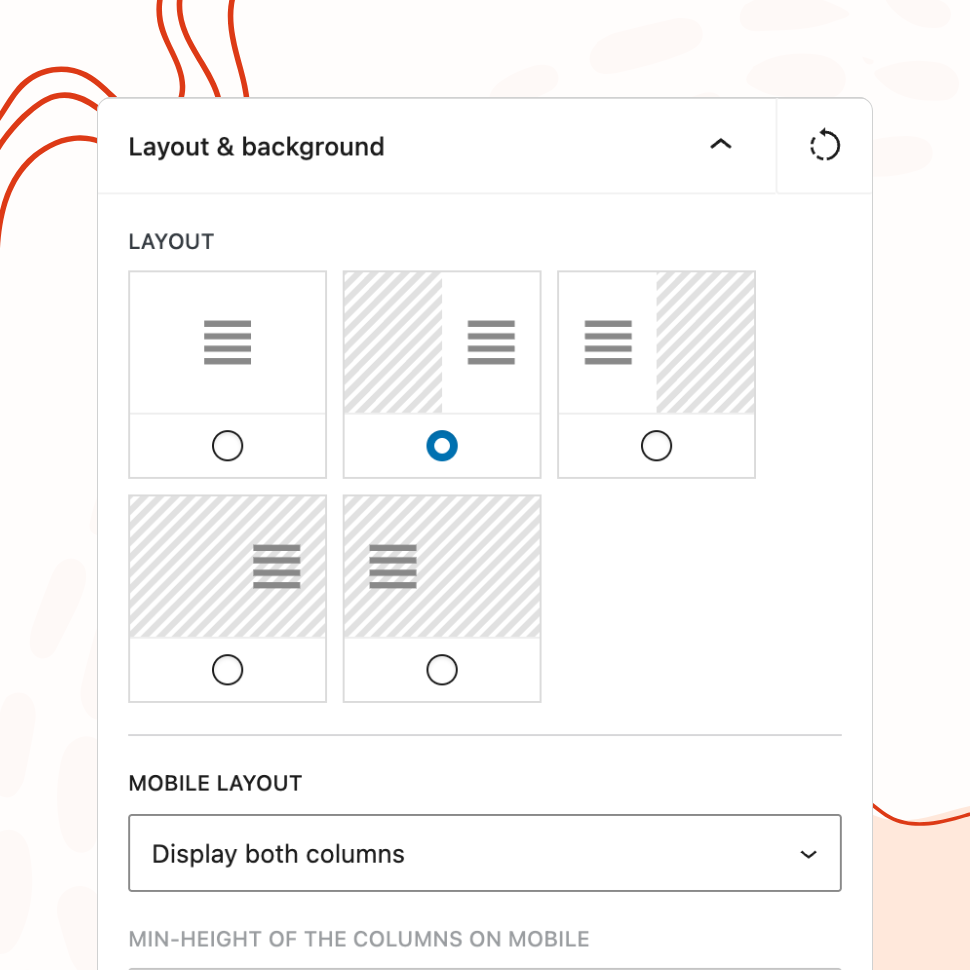
Layout Modes
Choose from Five Layout Modes
Select from default, background-left, background-right, form-left, or form-right layouts to create the perfect composition for your login page.
Slider Backgrounds
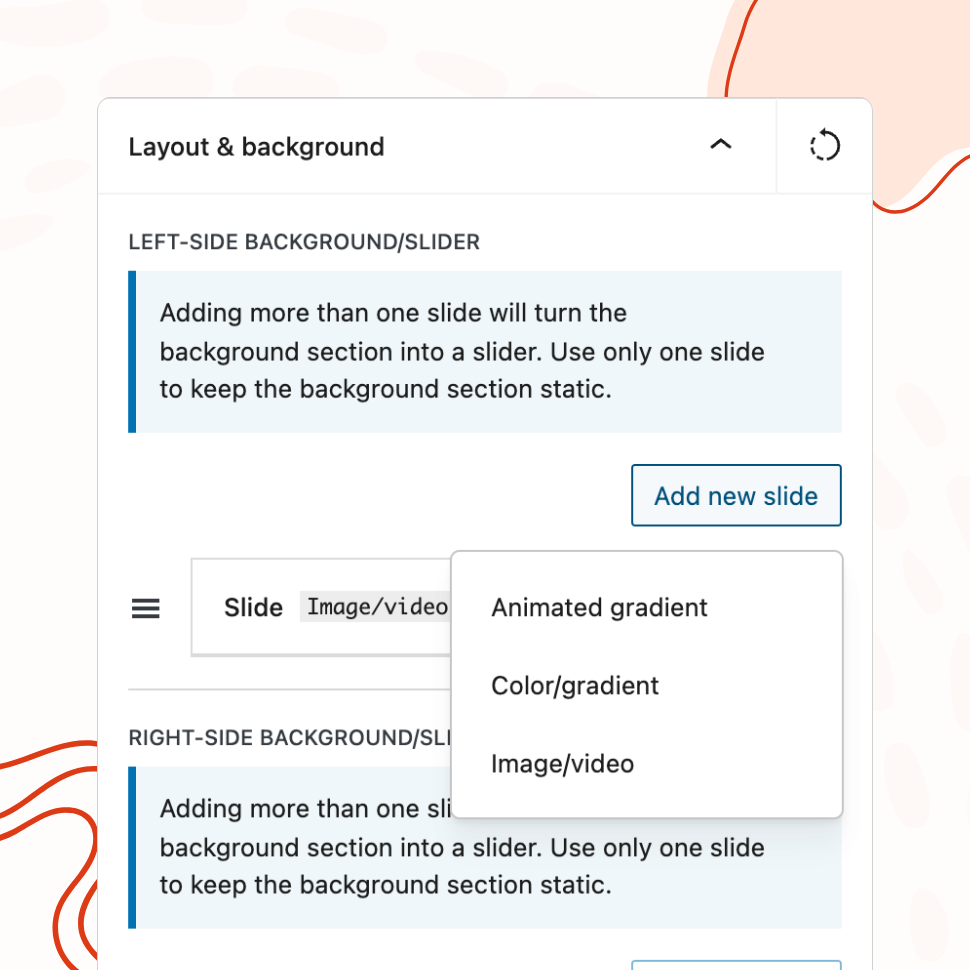
Add Image, Video, Color, and Gradient Sliders
Create dynamic backgrounds with multiple slides, autoplay, navigation arrows, pagination dots, and configurable direction and speed.
Combine image/video slides with color gradients and animated gradients in a single slider for rich, layered backgrounds.
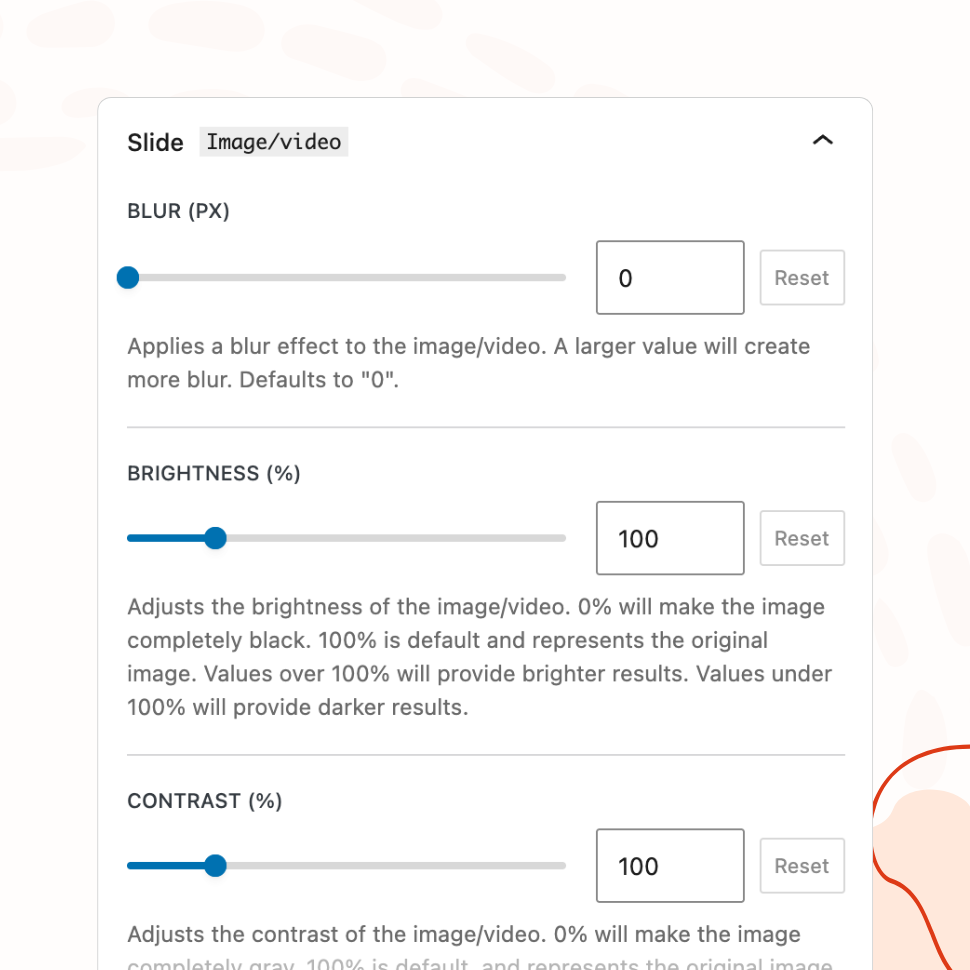
CSS Filters & Overlays
Apply Professional Image Filters and Color Overlays
Fine-tune your background images with blur, brightness, contrast, grayscale, hue-rotate, saturation, sepia, and color overlay controls.
How Advanced Layouts Create Premium Login Experiences
The default WordPress login page places a form in the center of a white screen. Most customization plugins improve on this by letting you change the background color or add an image. But the fundamental layout stays the same — a single column with a centered form.
WP Custom Login PRO breaks out of that constraint entirely. Five layout modes, slider-powered backgrounds, and professional image filters give you the tools to build login pages that look like they were designed by a frontend developer — not generated by a plugin. The difference is immediately visible: a split-screen layout with a full-bleed image on one side and a styled form on the other communicates a level of polish that a centered form on a flat background simply cannot.
This matters because the login page often sets expectations for what’s behind it. A visually striking login page suggests a well-built, modern site. A plain one suggests the opposite, regardless of how good the rest of the site actually is.
Split-Screen Layouts for Visual Impact
The plugin offers five layout modes: default (centered form), background-left, background-right, form-left, and form-right. The split-screen options divide the login page into two columns — one for the form, one for visual content — creating a layout commonly seen on SaaS products, enterprise dashboards, and premium web applications.
Split-screen layouts work well because they give the background room to breathe. Instead of competing with the form for attention, the background occupies its own dedicated space. A full-height brand photograph on the left with a clean form on the right. A gradient with your logo mark on one side and the login form on the other. The two halves complement each other rather than fighting for the same real estate.
Mobile behavior is handled automatically. On smaller screens, the layout adapts so the form remains accessible without sacrificing the design intent of the desktop view.
Dynamic Backgrounds That Stand Out
A static background image is a significant upgrade over a flat color, but the PRO version goes further with slider-powered backgrounds that add movement and depth to the login page.
You can combine multiple slides in a single slider — cycling through brand photography, product shots, or seasonal images with configurable autoplay, speed, and transition direction. Navigation arrows and pagination dots are optional, giving you control over whether users can interact with the slider or simply watch it cycle.
Three slide types can be mixed within the same slider. Image and video slides for photography and motion content. Color and gradient slides for clean, abstract backgrounds. Animated gradient slides that shift smoothly between colors, creating a subtle sense of movement without the weight of a video file.
On top of any image or video slide, you can apply CSS filters — blur, brightness, contrast, grayscale, hue-rotate, saturation, and sepia — plus a color overlay. This means a single photograph can produce dozens of different looks. Darken it and add a blue overlay for a corporate feel. Desaturate it and increase contrast for a dramatic editorial look. Blur it slightly so the form pops against a soft background. The source image stays the same; the filters shape the mood.
Agency White-Labeling with Unique Designs
For agencies managing multiple client sites, advanced layouts solve a specific problem: making each client’s login page feel distinct without designing each one from scratch.
The combination of layout modes, slider backgrounds, and image filters creates a large design space from a small set of inputs. Two client sites can use the same split-screen layout but feel completely different — one with a full-bleed landscape photograph filtered to match the brand palette, the other with an animated gradient that shifts between the client’s brand colors. The underlying plugin configuration is similar; the visual results are not.
This is particularly valuable when clients compare notes. If two of your clients happen to discuss their WordPress sites and both have identical-looking login pages, it undermines the perception of custom work. With five layout modes, unlimited slide combinations, and per-slide filter controls, the likelihood of two login pages looking alike is effectively zero.
Templates accelerate this further. Apply a split-screen template, swap the background for client photography, adjust the color overlay to match their brand, and the login page is done. The design decisions that require taste and experience — proportions, spacing, typography hierarchy — are already handled by the template. The brand-specific decisions that require client knowledge — colors, imagery, logo — are the only ones you need to make.
Features
Explore These Powerful Features Next
Discover the features offered by the WP Custom Login plugin for WordPress.
Pre-Designed Templates
Choose from 20+ ready-made login page designs and apply them with one click. Use any template as a starting point, then customize freely.
Custom Logo & Branding
Replace the WordPress logo with your own image or site icon. Add a branded footer and social media links to create a fully personalized login page.
Form & Input Styling
Customize labels, input fields, buttons, checkboxes, and error messages with granular controls — including separate styles for normal, hover, and focus states.
Advanced Backgrounds & Layouts
Use split-screen layouts, image and video sliders, animated gradients, and CSS filters to create a premium login page that goes beyond a simple background color.
Post-Login Redirects
Define redirect rules based on user roles or individual users, so administrators, editors, and subscribers each land on the most relevant page after login.
Custom Login URL
Replace wp-login.php with a custom login path. Block or redirect direct access to the default URL, with built-in validation to prevent lockouts.
Easy Setup with Live Preview
Configure every aspect of your login page from a visual settings panel with an instant live preview. No CSS knowledge or page refreshing required.